- Published on
Page Builder Media Upload Fails for Page Owner Roles
- Authors

- Name
- Ben Sewards
- @BenjaminSewards
Our authoring team came across an odd scenario in XM Cloud Page Builder: they could happily edit text on their permission-allowed pages, but the moment they went to upload or change media, they were left with a very high-level toast error in the bottom-left corner of the canvas — "an error prevented the operation from completing".
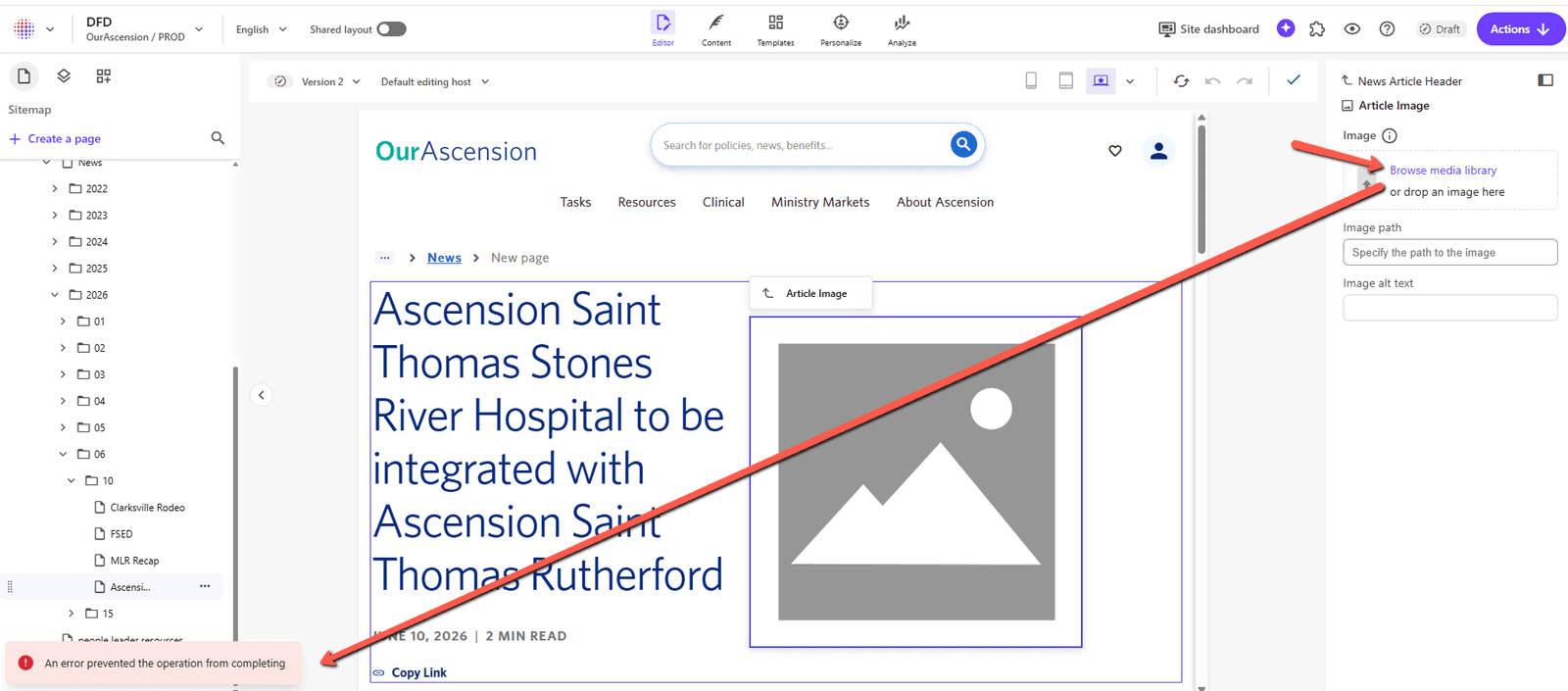
TLDR: A "Page Owner" permission model that breaks inheritance on the media library, combined with the SXA
$siteMediatoken on an Image field, leaves the context user unable to resolve the field's data source. The fix is to grant read access to the SXA Site Virtual Media Folder.
The Permission Model
With our "Page Owner" permission model, we went with an "opt-in" approach that only allows these types of authors to see the pages and media that they own. The model uses "breaks inheritance" in the content and media areas from a "Base Author" role, and each individual "Page Owner XYZ" role re-enables read access to its own areas.
It's a tidy model on paper — authors only ever see their slice of the tree. But that toast was a hint we'd locked something down a little too far.
Digging Into the Error
The toast itself tells you nothing, so we headed straight for the HAR trace. There we could see a failed request to sitecore/api/ssc/horizon/query/?sc_horizon=api&sc_headless_mode=api:
{
    "data": {
        "item": {
            "id": "44632364-fa51-4e0a-bad7-e2ab387a204a",
            "template": {
                "id": "f6c7f20b-f427-4fef-b184-f08e27117545",
                "field": {
                    "id": "0ca79275-bfd9-4ffe-acdd-3b251210cb8f",
                    "sources": null,
                    "__typename": "TemplateField"
                },
                "__typename": "Template"
            },
            "__typename": "Item"
        }
    },
    "errors": [
        {
            "message": "GraphQL.ExecutionError: Error trying to resolve sources. ---> System.ArgumentOutOfRangeException: Empty string is not allowed.\r\nParameter name: query.\r\nActual value was .\r\n   at Sitecore.Diagnostics.Error.AssertString(String argument, String name, Boolean allowEmpty)\r\n   at Sitecore.Data.Items.ItemAxes.SelectItems(String query)\r\n   at Sitecore.XA.Foundation.Multisite.Pipelines.GetRootSourceItems.ResolveTokenRelativeQuerySource.ResolveQuerySource(String source, Item contextItem)\r\n   at Sitecore.XA.Foundation.Multisite.Pipelines.GetRootSourceItems.ResolveTokenRelativeQuerySource.Process(GetRootSourceItemsArgs args)\r\n   at (Object , Object )\r\n   at Sitecore.Pipelines.CorePipeline.Run(PipelineArgs args)\r\n   at Sitecore.Pipelines.DefaultCorePipelineManager.Run(String pipelineName, PipelineArgs args, String pipelineDomain, Boolean failIfNotExists)\r\n   at Sitecore.XmCloud.Prometheus.Beats.Pipelines.MeasuredPipelineManager.Run(String pipelineName, PipelineArgs args, String pipelineDomain, Boolean failIfNotExists)\r\n   at Sitecore.Pipelines.DefaultCorePipelineManager.Run(String pipelineName, PipelineArgs args, String pipelineDomain)\r\n   at Sitecore.Horizon.Integration.GraphQL.GraphTypes.TemplateFieldGraphType.ResolveSources(TemplateFieldItem item, HorizonQueryContext queryContext)\r\n   at GraphQL.Resolvers.FuncFieldResolver`2.GraphQL.Resolvers.IFieldResolver.Resolve(ResolveFieldContext context)\r\n   at GraphQL.Instrumentation.MiddlewareResolver.<Resolve>d__2.MoveNext()\r\n--- End of stack trace from previous location where exception was thrown ---\r\n   at System.Runtime.ExceptionServices.ExceptionDispatchInfo.Throw()\r\n   at System.Runtime.CompilerServices.TaskAwaiter.HandleNonSuccessAndDebuggerNotification(Task task)\r\n   at GraphQL.Execution.ExecutionStrategy.<ExecuteNodeAsync>d__7.MoveNext()\r\n   --- End of inner exception stack trace ---",
            "locations": [
                {
                    "line": 8,
                    "column": 9
                }
            ],
            "path": [
                "item",
                "template",
                "field",
                "sources"
            ],
            "extensions": {
                "code": "ARGUMENT_OUT_OF_RANGE"
            }
        }
    ]
}
The stack trace confirmed the culprit: the context user was failing inside the SXA token processor at Sitecore.XA.Foundation.Multisite.Pipelines.GetRootSourceItems.ResolveTokenRelativeQuerySource. The query argument arrived empty (Empty string is not allowed) because the token couldn't resolve to a media path the user was actually allowed to read.
When This Happens
This is most likely to bite you when both of the following are true:
- You are configuring permissions without any base "SXA Author" role.
- You are using the SXA
$siteMediatoken on an Image field.
The $siteMedia token queries your site's virtual media folder, which is itself a reference to the actual site media folder under the media library tree. The Image field resolves its data source through that token — and our locked-down Page Owner had no read access there to resolve it. Text fields don't lean on the token, which is exactly why editing copy worked while touching media didn't.
The Fix
The fix is refreshingly small. We simply had to add single-item read access to the SXA Site Virtual Media Folder for the affected role:
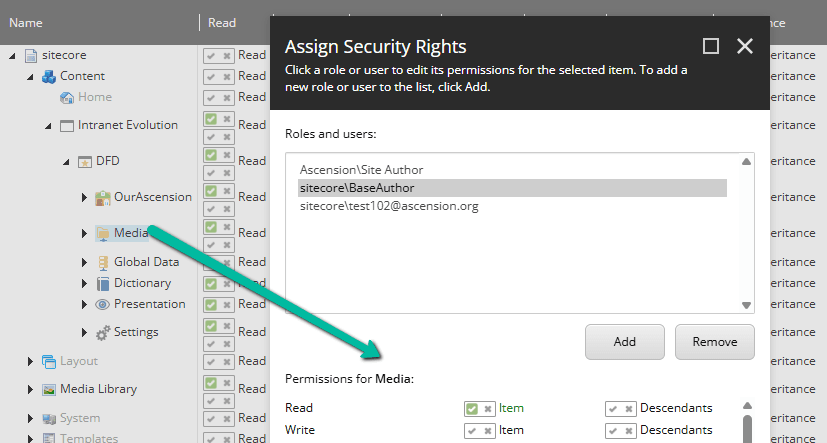
With that single read-access bit in place, the $siteMedia token resolves, the GraphQL query finds its source, and media upload in Page Builder works again — no more mystery toast.
Bonus: "You Do Not Have Permission to Upload File"
With that fixed, the authors came back to us with a second error: "You do not have permission to upload file".
This one rang a bell from the Sitecore XP 9.0 days — the upload dialog has a core database item that the author's role needs read access to. By default, the Everyone role sets a deny on inheritance at that level, which quietly breaks the read-everything chain. I granted read access there... and the error stubbornly remained.
The real culprit was our own doing. The Site Owners and Page Owners were deliberately set up without Write, Rename, Create, and Delete access on the root media folders — we didn't want authors uploading media at the two root levels (the Project media folder and the "Shared" media folder). Granting that access cleared the upload error.
That fix is a bit heavier-handed than I'd like, since it reopens the very root levels we were trying to protect. I'll report back here with an update if I find a way to keep authors out of those top-level folders while still letting them upload where they belong.