- Published on
Building Sitecore Raft: Automating Content Migration with the New SitecoreAI Content Transfer API
- Authors

- Name
- Ben Sewards
- @BenjaminSewards
I've been doing too much legacy serialization transfers between environments lately — breaking large chunks of content down into steps via serialization tagging, kicking off dotnet sitecore ser push -n uat -i tags:[FunctionSites], and hoping my laptop doesn't time out before the content push finishes.
So when Sitecore announced the new Content Transfer API for SitecoreAI, I had a proof of concept running locally the very next day. I've been running it consistently the entire week since, and I'm ecstatic to share a iteration that contains a step-by-step wizard I'm calling Sitecore Raft (a play off the .raif file extension used by the API). While the entire app can be automated, I chose to break it down into discrete steps to make it easier to follow and understand.
TLDR: The new Content Transfer API (paired with the Item Transfer API) turns environment-to-environment content migration into a headless, automatable, observable pipeline — the source packages its own content server-side and the target consumes it, with no developer workstation in the hot path. It's a different tool than Sitecore Content Serialization with coarser controls, and there are a handful of gotchas the docs don't tell you — including one merge strategy that can take your CM down.
Raft your content between Sitecore environments — a Next.js wizard over the SitecoreAI Content Transfer + Item Transfer APIs.
IMPORTANT
Raft was built as a proof of concept to learn the API. It is not production-hardened — treat it (and any findings below) as POC-quality and test thoroughly before relying on it.
How the Two APIs Work Together
Two complementary APIs form a single migration workflow between SitecoreAI environments — a source (e.g. PROD) and a target (e.g. UAT):
- Content Transfer API — create a transfer operation on the source, monitor it, stream the content across in chunks, and "complete" each chunk set into a
.raifpackage on the target. - Item Transfer API — consume those
.raifpackages into the target database, then inspect transferred items, retry failed sources, and review history.
The whole point is to automate content imports from source to target — end-to-end and headless, such as within a CI/CD pipeline. Content is read from the source and lands at the target. You don't "push" from a laptop; the source packages its own content and the target consumes it.
The flow at a glance:
A few mechanics worth knowing up front:
- A transfer contains one or more chunk sets (each = one nominated data tree), and each chunk set becomes exactly one
.raiffile — namedcontentTransfer-<transferId>-<chunksetId>.raif. - Content chunks are encrypted; media chunks are compressed. Chunk bytes are forwarded target-ward unaltered.
- Auth is cloud-native: an automation client exchanges
client_credentialsfor a JWT, used against both hosts.
The name "Raft" nods to those .raif packages — rafts that carry your content across. Raft your content between Sitecore environments.
The "Before": Serialization Pull/Push (and Babysitting the Console)
Previously, moving content between environments meant the Sitecore Content Serialization (SCS) CLI — ser pull from the source and ser push to the target — and then sitting there monitoring progress in the console, re-running individual tags whenever a chunk of the tree failed. Our real workflow looked like this:
dotnet sitecore cloud login
dotnet sitecore cloud environment connect --environment-id ENV_ID --allow-write true
dotnet sitecore ser pull -n prod -i tags:[step1]   # Home, Global Data
dotnet sitecore ser pull -n prod -i tags:[step2]   # Other Media
dotnet sitecore ser pull -n prod -i tags:[step3]   # All sites content + media
dotnet sitecore ser pull -n prod -i tags:[step4]   # Other pages
dotnet sitecore ser push -n uat -i tags:[step1..4]
...with per-site fallbacks (FunctionHomePage / ResourceHomePage / MinistryHomePage) whenever a big step failed — i.e. break the job into smaller tag runs and retry. Content was described in *.module.json files: includes with { path, scope, allowedPushOperations }, grouped by tags.
The pain points: pull writes the entire set to local disk (media as base64 inside YAML), push streams it all back up — your workstation is in the hot path both ways — and "monitoring" means scrolling CLI output with no real progress signal or item counts.
Content Transfer vs. Serialization: What's Actually Different
Rows marked (unverified) are inferred and flagged for your own validation; everything else I confirmed against the live API while building Raft.
| Capability | Legacy SCS (ser pull/push) | Content Transfer + Item Transfer |
|---|---|---|
| Primary purpose | Content-as-code / dev deployment | Environment-to-environment content migration |
| Artifact | One human-readable .yml per item, on disk | Opaque binary .raif package in blob storage |
| Version-control friendly | Yes — git, diffs, PR review, CI/CD | No — binary, not diffable |
| Transport | Local files + CLI push from a workstation | Chunked streaming (content encrypted, media compressed) |
| Local disk footprint | Full copy on workstation (media as base64 → large) | None for large runs — package built server-side into blob |
| Scope options | SingleItem, ItemAndChildren, ItemAndDescendants, DescendantsOnly, Ignored | SingleItem, ItemAndDescendants only |
Sub-path rules (includes.rules) | Yes — per-path include/exclude, per-rule scope/ops | No — a data tree is just { ItemPath, Scope, MergeStrategy } |
| Field-level exclusion | Yes (excludedFields) | No — full items are transferred |
| Conflict handling | allowedPushOperations: CreateOnly / UpdateOnly / CreateAndUpdate / CreateUpdateAndDelete | MergeStrategy: OverrideExistingItem / KeepExistingItem / LatestWin* / OverrideExistingTree |
| Delete / orphan removal | Yes (removeOrphans, CreateUpdateAndDelete) | Not clearly exposed — OverrideExistingTree may replace a tree (unverified) |
| Roles & users / security | Yes — serializes roles and users | Appears content/media only (unverified) |
| Media handling | Base64 inline in YAML (bloats files, slow git) | Compressed binary chunks in blob — purpose-built for volume |
| Progress / monitoring | CLI console output | API: transfer state, chunk sets, TransferredItemsCount/TotalItemsCount, history, retry |
| Dry-run / comparison | Version comparison available | None — merge applied at consume time |
| Auth | CLI cloud login + environment connect | Automation-client JWT (cloud-native, headless) |
| Throughput | Varies | Ingest ~4 items/sec; media chunk copy is bandwidth-bound |
* LatestWin — see the warning below. Do not use it.
Where the New API Wins
Leading with the big one: automation.
- Headless, end to end — direct source → target, no intermediate git repo, no CLI login on a dev machine. Automation-client credentials + JWT make it fully scriptable.
- No workstation bottleneck for packaging — the
.raifis built server-side into blob storage, so big media-heavy migrations don't need gigabytes of local files. - Built for content + media volume — content encrypted and media compressed in transit; media rides as binary chunks instead of base64-in-YAML.
- Programmatic monitoring, retry, and history — transfer/chunk-set state, live item counts, per-source retry, and a consume history are all API-exposed. Real progress signals, not console tailing.
- Resilient chunking — failed sources can be retried without redoing everything.
Where SCS Still Wins
Being honest about the gaps:
- Coarser scope — only
SingleItemandItemAndDescendants; noItemAndChildren,DescendantsOnly, orIgnored. - No rules engine (
includes[].rules) and no field-level exclusion (excludedFields). - No deterministic, diffable artifact — the
.raifis opaque and blob-hosted — and no dry-run/diff. - Weaker delete/orphan and roles/users story (unverified).
When to use which: SCS for templates, renderings, settings, and other content-as-code in git + CI/CD — anywhere you need rules, field exclusion, security items, or a reviewable diff. Content Transfer + Item Transfer for bulk, one-directional content/media migration between environments — large payloads, headless and automated, no git artifact wanted. It's an operations/migration tool; SCS is a content-as-code tool.
What Doesn't Work (Yet) — Gotchas the Docs Don't Tell You
WARNING
Do not use the LatestWin merge strategy. It is not implemented yet (ask me how I know), and using it can take your CM environment down. Stick to OverrideExistingItem (the default), KeepExistingItem, or OverrideExistingTree.
The rest of these were all verified the hard way while building Raft:
- Consume from blob, not the file system. The "complete chunk set" step writes the
.raifto Azure blob storage, not the CM file system. After completion,GET /sources/filesis empty whileGET /sources/blobsshows the file (BlobState: "Uploaded"). So consume with?blobName=...— the?fileName=path only applies to.raiffiles physically on the CM disk, which is rare in XM Cloud. - HTTP 411 "Length Required" on body-less POSTs. Consume and retry are body-less POSTs; without an explicit
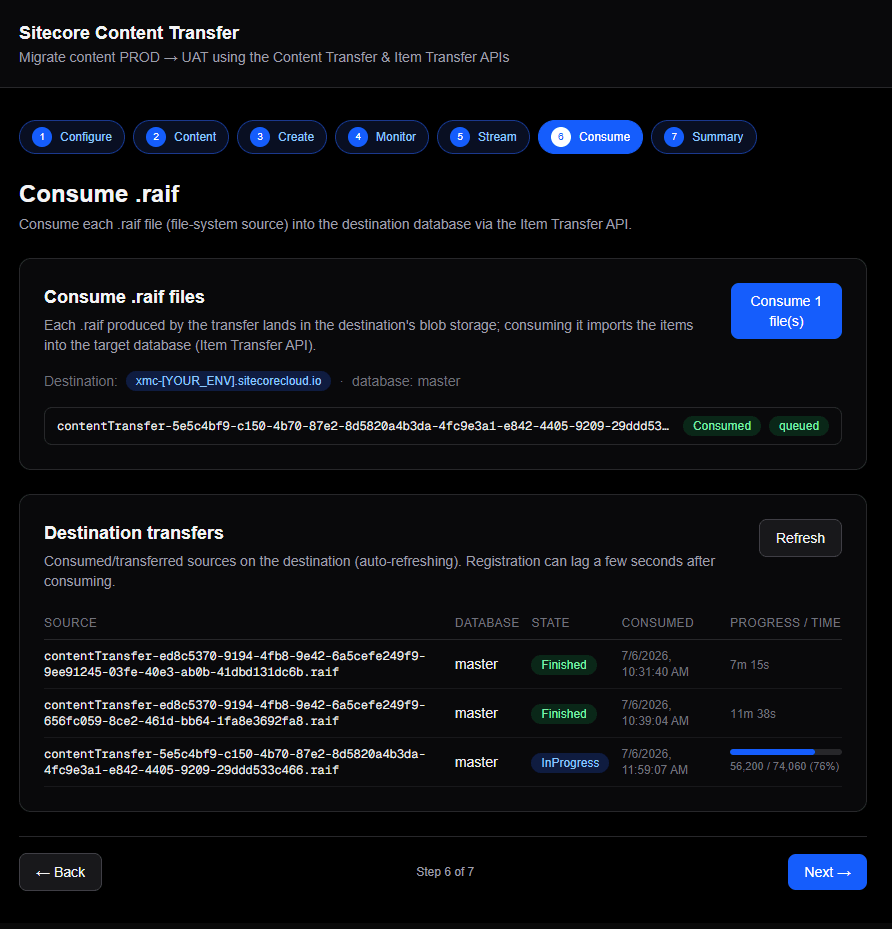
Content-Length, the Sitecore edge (Cloudflare/IIS) rejects them with a 411. Send an empty body soContent-Length: 0is emitted. Confusingly, streaming worked fine because "complete" is served by a different edge path — an asymmetry that cost me some head-scratching. ItemAndChildrenscope isn't supported. TheTreeScopeenum is{ SingleItem, ItemAndDescendants }. SendingItemAndChildrenreturns HTTP 400 (Invalid value 'ItemAndChildren' for enum 'TreeScope'...). Remap it toItemAndDescendants— which is broader (all descendants, not just direct children). I verified this with a three-way probe: a valid scope with a bogus path failed later on path resolution, proving the enum validation is server-side.- Ingest runs at ~4 items/sec, server-side for larger transfers containing media items. Consume writes roughly 4 items/sec (~240/min), roughly size-independent: 1,718 items took ~7 minutes; 74,060 items took multiple hours. Once the blob hits
Consumed, ingestion runs entirely on the target — closing the app does not stop it (the app only polls). Estimate:TotalItemsCount / 4seconds. - Progress only lives on the details endpoint.
GET /transfersandGET /historyreport state transitions only — no incremental progress, so a long consume looks frozen atInProgress.GET /transfers/{id}exposesTransferredItemsCount/TotalItemsCount, which advances live. /historycan omit theFinishedevent on large transfers. My 74,060-item transfer completed (blobTransferred,/transfers/{id}reportingFinishedat 74060/74060), yet/historylisted only[{ InProgress }]./historyis not a reliable completion/timing signal — trust/transfers/{id}.BlobStatelifecycle:Uploaded → Initializing → Consumed → Transferred. "Consumed" means read and ingesting; "Transferred" means fully written to the database.- Transfer-list lag. After consuming,
GET /transferscan take ~10–15s to register the transfer and may briefly showTransferState: "Unknown"even once the blob readsConsumed.BlobStateis the better signal. - Media payload is the transport bottleneck. Each chunk copy relays source → app server → target (a double hop). Content chunks copy in ~300ms; media chunks (tens or hundreds of MB) took 45–53s each. Nothing to fix here; that's just the price of relaying big media across two hops.
The Sitecore Raft Module
Raft is a Next.js (App Router) wizard that drives the full Content Transfer + Item Transfer workflow via forms — making every API parameter and every state transition visible. It was built to learn the API, and it turned out to be the fastest way to actually do that.
Video Demo:
Prerequisites
- A SitecoreAI automation client (client id + secret). You'll need Org Admin/Owner to create it.
- Node + pnpm;
pnpm install(the native build scripts for sharp/unrs-resolver are pre-approved inpnpm-workspace.yaml— run install once more if prompted), thenpnpm dev→http://localhost:3000. - An
.env.local(server-side only; copy the example .env.example file and rename it to.env.local):
SITECORE_CLIENT_ID=...            # automation client id
SITECORE_CLIENT_SECRET=...        # automation client secret
SITECORE_AUTH_URL=https://auth.sitecorecloud.io/oauth/token
SITECORE_AUTH_AUDIENCE=https://api.sitecorecloud.io
SITECORE_SOURCE_HOST=             # optional default; can also be entered in the UI
SITECORE_DEST_HOST=
The auth model: client_credentials → JWT (audience https://api.sitecorecloud.io), valid ~24h, cached server-side and refreshed on expiry/401. One org-level client authenticates both hosts.
The Steps
Step 1 — Configure. Enter the source host, destination host, and target database; a "Test authentication" button confirms credentials by fetching a JWT before you do anything else.
NOTE
Raft uses organization-level automation credentials — one automation client that works across the org's environments. You can switch to per-environment credentials if you'd rather scope access to a single environment; the trade-off is org-wide convenience vs. a tighter, environment-scoped radius.
One UX decision I'm happy with: rather than force users to hand-type item paths, Raft lets you import and parse existing Sitecore serialization module.json files — reusing the artifacts teams already maintain — and translates their includes into transfer data trees.
Step 2 — Select content. Import per serialization module.json (bundled samples auto-load, or upload your own). "Add by tag" adds every item tree carrying a tag (step1..step4, site, ...) across all modules in one click — mirroring ser pull -i tags:[...]. You can also manually add/edit ItemPath, Scope, and MergeStrategy, with automatic de-duplication by item path and scope-remap warnings (ItemAndChildren → ItemAndDescendants).
Step 3 — Create. Preview the exact request body, then POST to create the operation on the source.
Step 4 — Monitor. Poll status until Completed; show the chunk sets (id / chunk count / item count).
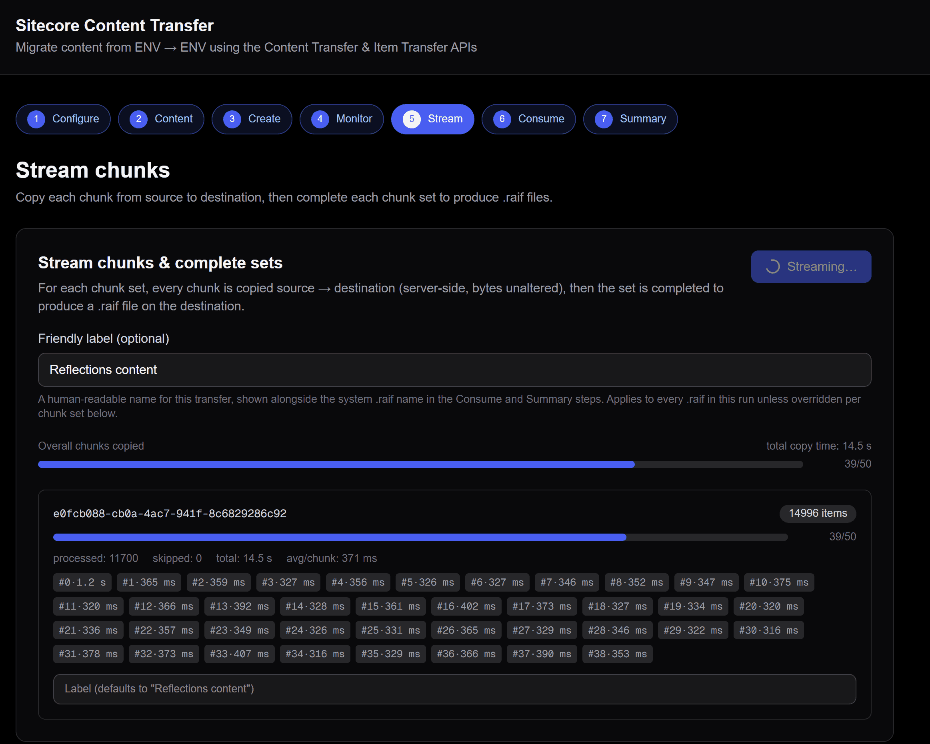
Step 5 — Stream. Copy every chunk source → target, then "complete" each chunk set into a .raif — with per-chunk copy timings and an optional friendly label for the run (shown primary over the system name).
Step 6 — Consume + Summary. Consume each .raif (by blobName) into the target database with a live item-count progress bar; a destination transfers table; blob sources + history views; and optional delete cleanup on the source. (The wizard technically shows 7 screens counting the Summary, but these six functional stages are the story.)
Key Implementation Details
- Server-side API proxy — all Sitecore calls go through Next.js route handlers; the browser only ever calls our own
/apiroutes and never seesCLIENT_ID/SECRETor the JWT (cached in server memory). - Binary chunk copy is paired server-side — a
GETfrom the source andPUTto the target, so payloads never round-trip through the browser. module.jsonimport + "Add by tag" — tag chips aggregate across modules with counts, plus dedupe.- Live monitoring + timing — per-chunk transport times (Stream) and live ingest progress + duration (Consume) via SWR polling, using
/transfers/{id}(not/history) as the source of truth for state and counts. - Resilience UX — wizard state persists to
localStorage, so a reload or recompile resumes where you left off; the stepper is fully navigable. Friendly labels are browser-local for now. - Stack: Next.js 16 (App Router), React 19, Tailwind 4, TypeScript, SWR.
In Summary
The new Content Transfer + Item Transfer APIs turn environment-to-environment migration into a headless, automatable, observable pipeline — a real upgrade over babysitting ser pull/ser push from a workstation. It's a different tool with a different job: coarser control and no diffable artifact, so SCS still owns content-as-code and fine-grained dev workflows. The docs leave gaps — the costly ones for me were consume-from-blob (not file), the 411/Content-Length quirk on body-less POSTs, and trusting /transfers/{id} (not /history) for progress. And building a thin wizard over the API was genuinely the fastest way to learn it.
One last time, because it matters: Raft is a proof of concept built to explore and learn the API. It is not production-hardened. Validate everything in a safe environment before relying on it — especially anything marked unverified above — and absolutely avoid LatestWin.