- Published on
Custom Site Token Resolver for Sitecore AI Microsite Architecture
- Authors

- Name
- Ben Sewards
- @BenjaminSewards
With SitecoreAI's Content SDK multisite support, many organizations are leveraging microsite architectures to manage multiple brand sites under a single Sitecore instance. Although SitecoreAI's SXA architecture provides built-in tokens like $site and $home, this did not align with our goal of supporting sites by virtual path, a current limitation in Content SDK code. The Content SDK Multisite implementation currently uses the hostname property to resolve the site context but not the virtual path, hopefully an enhancement for a future release!
Our sites are more-so microsites, where each brand sites represent a new virtual path, such as /brand-a, /brand-b, etc., Each brand site will have a similar set up to the SXA Site architecture with site data folders to hold global components at the site-level. It was important for the client to have the ability for different comms and authoring teams to manage content specific to their brand site, while still leveraging shared components and templates across the entire Sitecore instance, including global data and these site data areas.
The brand sites are directly added below the SXA Site tenant with a common base interface template, _BrandSite to help identify the root of each site and to provide site-specific settings and configurations. The top-level SXA Site is set up as the shared site so that during datasource selection the site/(site) data area gets picked up.
To get the brand site specific datasources working, we'll set up a new custom token resolver called $brandSite.
⚠️ It should be noted that Sitecore does not recommend deploying custom code to SitecoreAI environments. As always, please review Sitecore's guidelines and best practices for extending SitecoreAI functionality through channels such as the Sitecore Marketplace first before proceeding.
Implement the Custom Token Resolver
To create a custom token resolver for the $brandSite token in Sitecore AI, you can implement a class that inherits from ResolveTokensProcessor. This class will look for the $brandSite token in the query and replace it with the path of the Brand Site root item based on a specific template ID. The GetBrandSiteRoot method traverses up the content tree to find the appropriate item.
public class ResolveBrandSiteToken : ResolveTokensProcessor
{
    private readonly BaseTemplateManager _templateManager;
    private readonly string _brandSiteTemplateIdString;

    public ResolveBrandSiteToken()
    {
        _templateManager = ServiceLocator.ServiceProvider.GetRequiredService<BaseTemplateManager>();
        _brandSiteTemplateIdString = Settings.GetSetting("Brand.Platform.Pipelines.ResolveTokens.BrandSiteRootTemplateId");
    }

    public override void Process(ResolveTokensArgs args)
    {
        if (string.IsNullOrWhiteSpace(args.Query) || args.ContextItem == null || string.IsNullOrWhiteSpace(_brandSiteTemplateIdString))
        {
            return;
        }

        args.Query = ReplaceTokenWithItemPath(
            args.Query,
            "$brandSite",
            () => GetBrandSiteRoot(args.ContextItem),
            args.EscapeSpaces
        );
    }

    private Item GetBrandSiteRoot(Item context)
    {
        var brandSiteTemplateId = new ID(_brandSiteTemplateIdString);

        // Traverse up the content tree to find the Brand Site root item
        for (Item potentialSiteItem = context; potentialSiteItem != null; potentialSiteItem = potentialSiteItem.Parent)
        {
            var template = _templateManager.GetTemplate(potentialSiteItem);
            if (template != null && template.InheritsFrom(brandSiteTemplateId))
            {
                return potentialSiteItem;
            }
        }

        return null;
    }
}
Register the Custom Processor in the Pipeline
Apply the patch to register the custom token resolver in the resolveTokens pipeline. This ensures that the custom processor is executed before the default multisite token resolver.
<?xml version="1.0" encoding="utf-8"?>
<configuration xmlns:patch="http://www.sitecore.net/xmlconfig/">
	<sitecore>
		<settings>
			<setting name="Brand.Platform.Pipelines.ResolveTokens.BrandSiteRootTemplateId" value="{7F81B515-EB46-43D6-AF06-264740F66AC3}" />
		</settings>

		<pipelines>
			<resolveTokens>
				<processor
				  type="Brand.Platform.Pipelines.ResolveTokens.ResolveBrandSiteToken, Brand.Platform"
				  resolve="true"
				  patch:before="processor[@type='Sitecore.XA.Foundation.Multisite.Pipelines.ResolveTokens.ResolveMultisiteTokens, Sitecore.XA.Foundation.Multisite']" />
			</resolveTokens>
		</pipelines>
	</sitecore>
</configuration>
Test the Field Source Query
To use the custom $brandSite token in a Sitecore AI field source query, you can set up a query that references the token. For example, if you want to retrieve items under the Brand Site's Detail Hero Folder, you can use the following query within the rendering item's Datasource Location field:
query:$brandSite/*[@@templatename='Brand Site Data']/*[@@templatename='Detail Hero Folder']|query:$sharedSites/*[@@name='Data']/*[@@templatename='Detail Hero Folder']
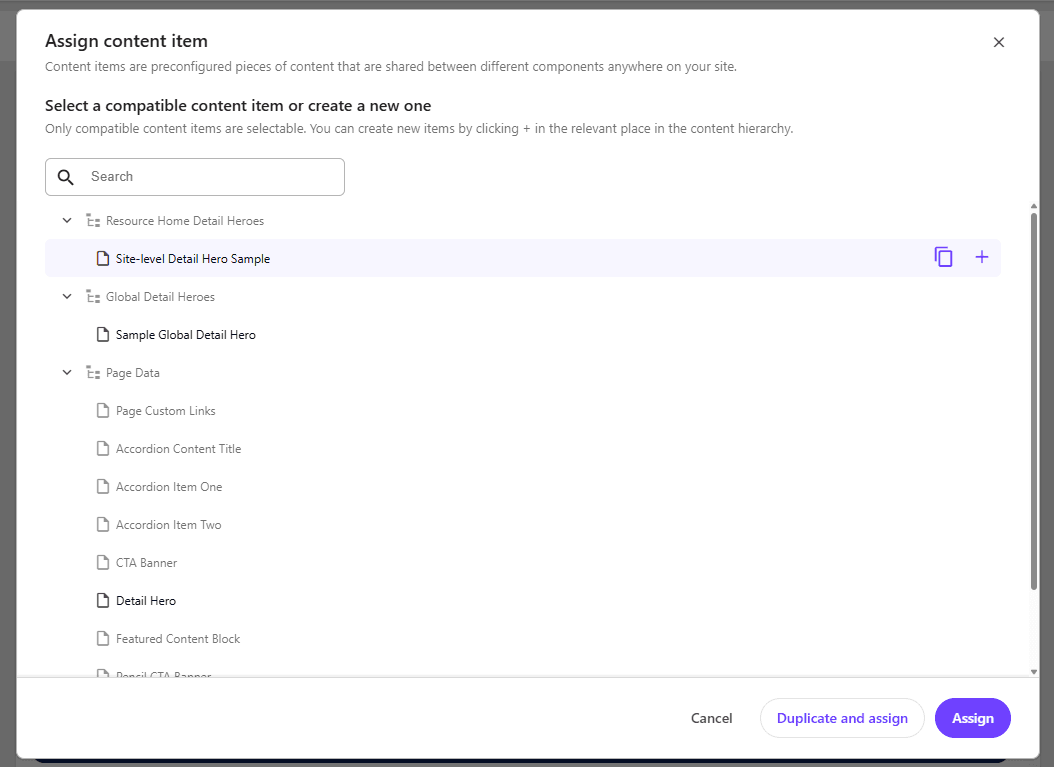
With the brand site branch templates configured to create the necessary data folders, authors can now select datasources specific to their brand site during content authoring. The screenshot below shows the datasource selection dialog with the custom $brandSite token in action resolving to either the correct site data folder, the global shared data folder, or page-level data folders: